


Intro
介绍
Here’s how I was able to take over your account in ChatGPT.
Last year Nagli discovered a web cache deception vulnerability in ChatGPT. The impact of this was critical, as it lead to the leak of user’s auth tokens and subsequently, an account takeover. OpenAI notified users of ChatGPT of this vulnerability, and quickly patched the bug… Or did they?
In this writeup, I will explain how I was able to abuse a path traversal URL parser confusion to achieve what I like to call a “wildcard” cache deception vulnerability, in order to steal user’s auth tokens and take over their accounts. I will make the assumption that readers know the basics of the web cache deception vulnerability, as I will not go into too much depth explaining it. If you are not already familiar with this awesome vulnerability yet, or would like a refresher, I highly reccomend to check out Nagli’s writeup first and come back to this one. Additionally, this bug uses a similar concept to the web cache poisoning vulnerability I found in Glassdoor last year, which allows us to cache “un-cacheable” files and endpoints. While it is not exactly the same technique, it demonstrates how much potential there is for URL parser confusions, specifically with path traversals, to open new doors for all sorts of cache vulnerabilities.
这是我如何能够接管你在 ChatGPT 上的账户的。
去年,Nagli 发现了 ChatGPT 中的一个网络缓存欺骗漏洞。这个漏洞的影响是严重的,因为它导致用户的身份验证令牌泄露,从而实现了账户接管。OpenAI 通知了 ChatGPT 的用户这个漏洞,并迅速修复了这个错误……或者说他们真的修复了吗?
在这篇文章中,我将解释我是如何利用路径遍历 URL parser 的混淆来实现我所称的“通配符”缓存欺骗漏洞,以窃取用户的身份验证令牌并接管他们的账户。我将假设读者了解网络缓存欺骗漏洞的基本知识,因此我不再深入解释。如果你还不熟悉这个很棒的漏洞,或者想要复习一下,我强烈建议你先查看Nagli的文章,然后再回来阅读这篇。此外,这个漏洞使用了与我去年在Glassdoor发现的网络缓存中毒漏洞类似的概念,这使我们能够缓存“不可缓存”的文件和端点。虽然这并不是完全相同的技术,但它展示了 URL parser 混淆,特别是路径遍历,如何为各种缓存漏洞打开新的大门。
Initial Discovery
最初的发现
While playing around with ChatGPT’s newly implemented “share” feature, which allows users to publicly share their chats with others, I noticed something weird. None of my shared chat links would update as I continued talking with ChatGPT. After dealing with bugs like this for a while, the first thing that came to mind was a caching issue. I figured that the shared chat was cached, and therfore wouldn’t update until the cache entry died. To test this out, I opened the network tab in my dev tools to check the response headers, and as I predicted, I saw the Cf-Cache-Status: HIT header. This was pretty interesting to me, as this was not a static file. I checked out the URL, and saw that the path did not have a static extension as expected:
https://chat.openai.com/share/CHAT-UUID
This meant that there was likely a cache rule that did not rely on the extension of the file, but on its location in the URL’s path. To test this, I checked https://chat.openai.com/share/random-path-that-does-not-exist And as expected, it was also cached. It quickly became evident that the cache rule looked something like this: /share/* Which means that pretty much anything under the /share/ path gets cached. This was immediatly a red flag (or green flag depending on how you look at it), as I made a note to myself during my last cache poisoning research that relaxed cache rules can be very dangerous, especially with URL parser confusions.
在折腾 ChatGPT 新实施的“分享”功能时,我注意到了一些奇怪的事情。我的共享聊天链接在我继续与ChatGPT对话时都没有更新。在处理这种错误一段时间后,我首先想到的是缓存问题。我认为共享聊天是被缓存的,因此在缓存条目失效之前不会更新。为了验证这一点,我打开了开发工具中的网络标签,检查响应头,果然看到了 Cf-Cache-Status: HIT 头。这让我感到很有趣,因为这并不是一个静态文件。我查看了URL,发现路径没有预期的静态扩展名:
https://chat.openai.com/share/CHAT-UUID
这意味着可能存在一个缓存规则,它并不依赖于文件的扩展名,而是依赖于其在 URL 路径中的位置。为了测试这一点,我检查了 https://chat.openai.com/share/random-path-that-does-not-exist,果然,它也被缓存了。很快就显而易见,缓存规则大致如下:/share/*,这意味着几乎在 /share/ 路径下的任何内容都会被缓存。这立即引起了我的警觉(或者说是好兆头,取决于你怎么看),因为我在上一次缓存中毒研究中记下过,过于宽松的缓存规则可能非常危险,尤其是在 URL parser 混淆的情况下。
Path Traversal Confusion
路径穿越混淆
In a website that uses caching, the request must go through the CDN before it gets to the web server. This means that the URL gets parsed twice, which makes it possible for a URL parser confusion. In ChatGPT’s case, a URL parser confusion meant that the two servers parse URL encoded forward slashes differently, where Cloudflare’s CDN did NOT decode and did NOT normalize a URL encoded path traversal, but the web server did. So a URL encoded path traversal allows an attacker to cache any file they wish from the server, including the highest impact API endpoints which contain authorization tokens. This sounds a bit confusing, so here is an example payload: Note that the %2F decodes to / and /api/auth/session is a sensitive API endpoint which contains the user’s auth token https://chat.openai.com/share/%2F..%2Fapi/auth/session?cachebuster=123 So let’s break this down.
- We’ve already established that the CDN will cache anything under
/share/ - We also said that the CDN will NOT decode nor normalize
%2F..%2F, therfore, the response WILL be cached - However, when the CDN forwards this URL, the web server WILL decode and normalize
%2F..%2F, and will respond with/api/auth/session, which contains the auth token.
Putting this together, when the victim goes to https://chat.openai.com/share/%2F..%2Fapi/auth/session?cachebuster=123, their auth token will be cached. When the attacker later goes to visit https://chat.openai.com/share/%2F..%2Fapi/auth/session?cachebuster=123, they will see the victim’s cached auth token. This is game over. Once the attacker has the auth token, they can now takeover the account, view chats, billing information, and more.
Here’s a little sketch I drew to help you all visualize this:
在一个使用缓存的网站中,请求必须先经过 CDN,然后才能到达 web 服务器。这意味着 URL 会被解析两次,这可能导致 URL parser 的混淆。在 ChatGPT 的案例中,URL parser 的混淆意味着两个服务器对 URL 编码的斜杠解析方式不同,其中 Cloudflare 的 CDN 没有解码也没有规范化URL编码的路径遍历,而 web 服务器则进行了处理。因此,URL 编码的路径遍历允许攻击者从服务器缓存他们希望的任何文件,包括包含授权令牌的高影响力 API 端点。这听起来有些复杂,下面是一个示例有效载荷:注意,%2F 解码为 /,而 /api/auth/session 是一个敏感的API端点,包含用户的授权令牌 https://chat.openai.com/share/%2F..%2Fapi/auth/session?cachebuster=123。让我们来分解一下。
- 我们已经确定 CDN 会缓存任何在
/share/下的内容 - 我们还说过CDN不会解码或规范化
%2F..%2F,因此,响应将被缓存 - 然而,当CDN转发这个URL时,web服务器会解码并规范化
%2F..%2F,并将响应为/api/auth/session,其中包含授权令牌。
将这些信息结合起来,当受害者访问https://chat.openai.com/share/%2F..%2Fapi/auth/session?cachebuster=123时,他们的授权令牌将被缓存。当攻击者稍后访问https://chat.openai.com/share/%2F..%2Fapi/auth/session?cachebuster=123时,他们将看到受害者的缓存授权令牌。这就意味着游戏结束。一旦攻击者获得了授权令牌,他们就可以接管账户,查看聊天记录、账单信息等。
这是我画的一幅小草图,帮助大家可视化这个过程:
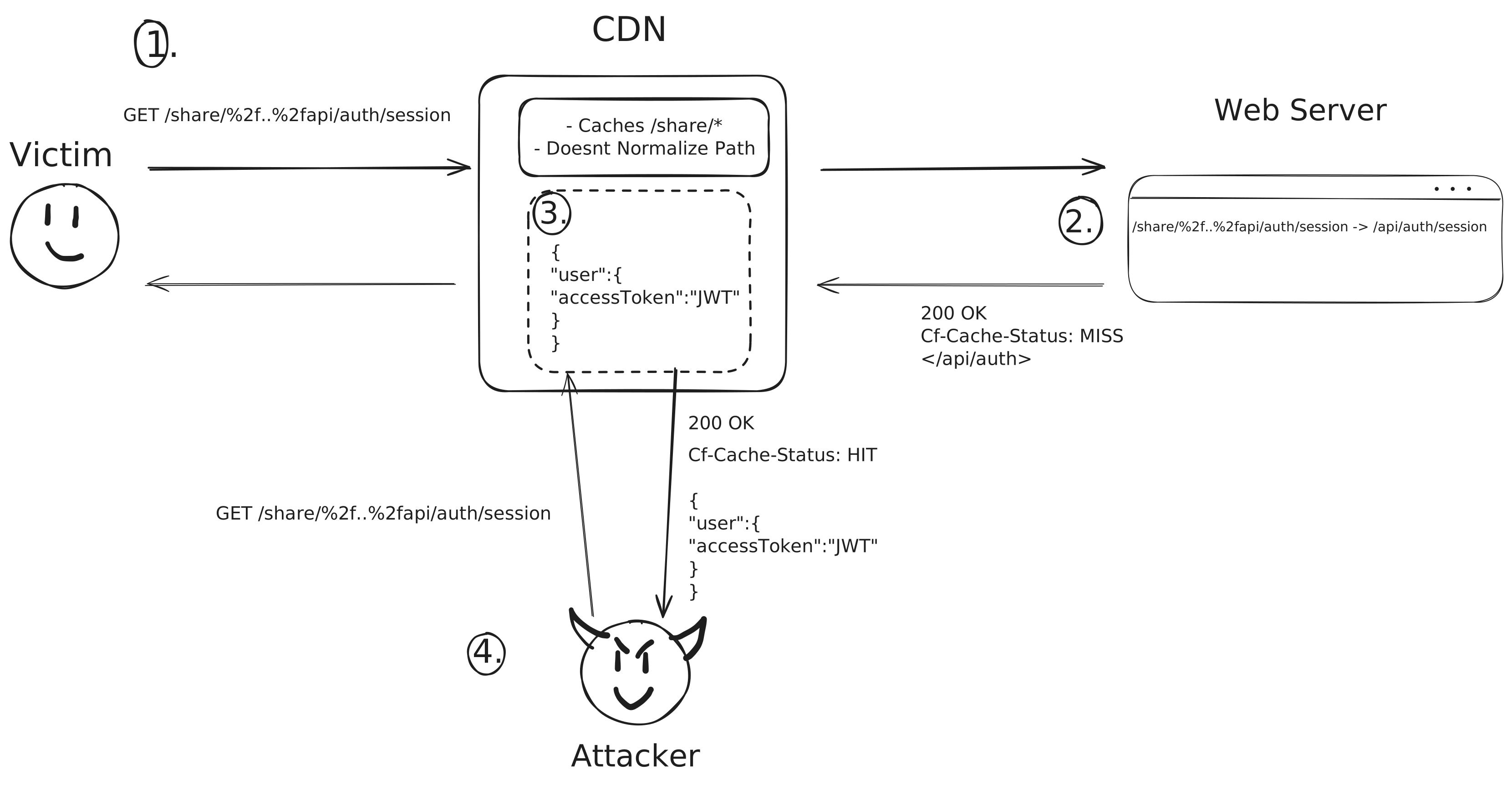
So to sum it all up in a sentence, I was able to use a URL encoded path traversal to cache sensitive API endpoints, thanks to a path normalization inconsistency between the CDN and web server.
Surprisingly, this was probably my quickest find in bug bounty, as well as one of my more interesting ones, and my biggest bounty thus far of $6500.